← Sree Divya / HEX Design System
Design System · Case Study

HEX — Unified
Design Experience

Three products. Eight designers. Zero shared language. I built HEX — a token-based, multi-product design system — that turned fragmented interfaces into one scalable foundation that design and engineering could build on and trust.

Design Systems Figma · Tokens WNS Global · SaaS Shipped Product Designer
HEX system overview hero walkthrough
35%
Faster design-to-dev handoff across 3 products
Products unified under one component library
↓40%
Fewer design review rework cycles post-launch
8
Designers aligned to a single source of truth
01 — Context

Before HEX, there was organised chaos

When I joined WNS Global's SaaS product division, the organisation was shipping three distinct enterprise products — each built by a different team, each with its own visual language, component patterns, and Figma file structure. On the surface, it worked. Under the surface, it was compounding debt with every release.

New features took twice as long to design because nothing reused. Engineering received designs from different files with different naming conventions, conflicting spacing values, and inconsistent component logic. Every designer had developed their own shortcuts. The three products had diverged to the point where a user moving between them encountered three different interaction models, three colour systems, and three ways to read a data table.

"Each team had built their own version of the same button. We were shipping inconsistency as a feature."

— Senior Engineer, WNS Global

HEX was not a cosmetic project. It was a structural intervention — one that required buy-in from engineering, product management, and the business before a single component was designed.


02 — The problem

Five failure modes, one root cause

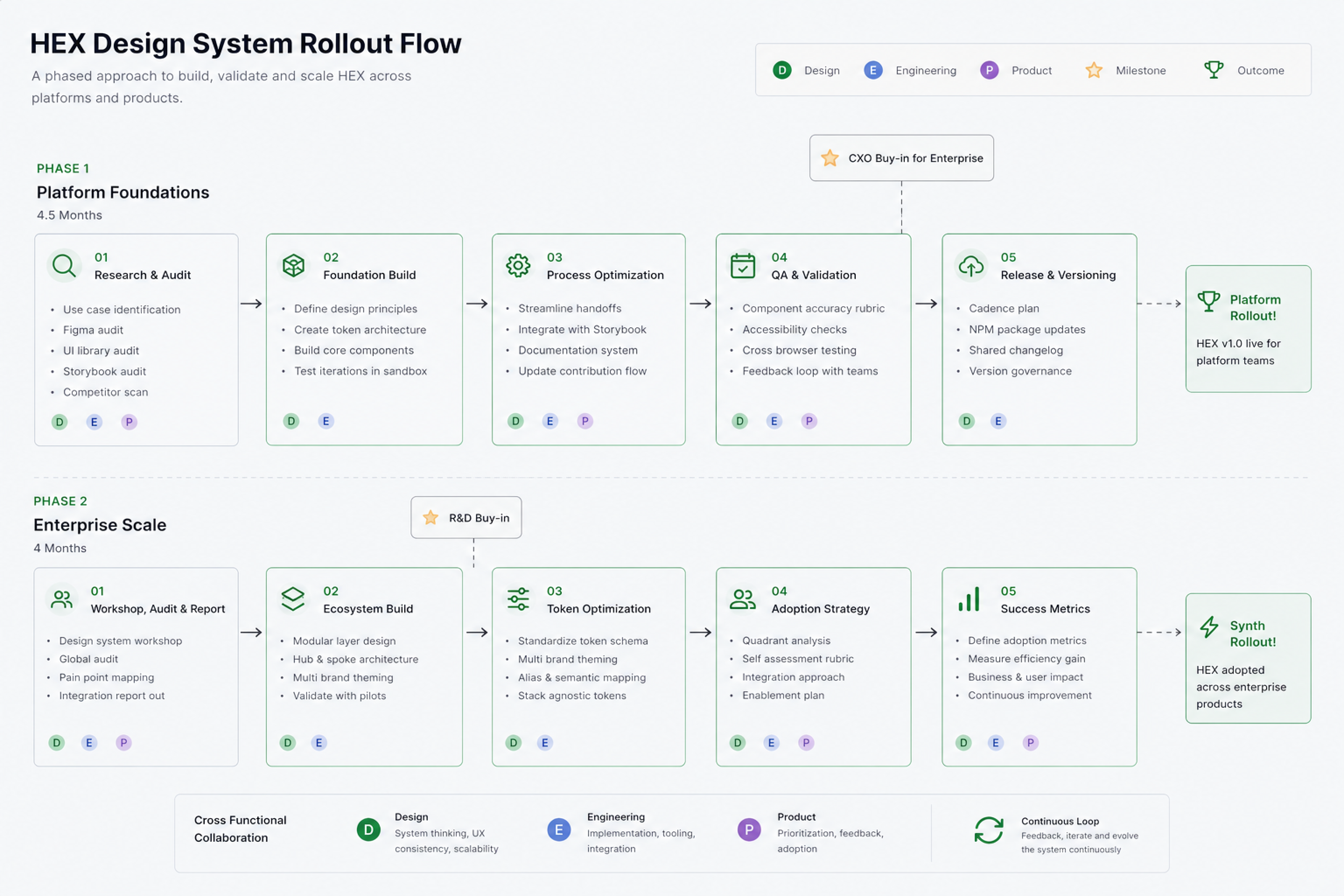
I spent the first two weeks auditing — not designing. A systematic inventory across all three products surfaced five recurring failure modes, all symptoms of the same root cause: the absence of a shared design language.

🎨
Colour entropy
47 distinct hex values in use across products — most slight variants of each other. No semantic meaning. Impossible to theme or maintain at scale.
Aa
Typography drift
11 different font-size values in active use. No defined type scale, no consistent hierarchy. Designers approximated from memory each time.
Component duplication
The same button component existed in 6 different Figma files, each with different states, naming, and token attachment. Engineering maintained 4 separate implementations.
🔗
Broken handoff
Without shared components, every handoff required manual annotation of spacing, states, and behaviour. Engineers reverse-engineered design intent from static files.
🌗
Dark mode blocker
Product roadmap required dark mode across all products. The existing colour system had no semantic layer — dark mode would require a full visual rebuild without a token system.
📏
Spacing arbitrariness
Padding and gap values were set by eye. No spacing scale existed. Components from different designers felt visually inconsistent even when using the same elements.

03 — My role

I led the system. And that meant everything.

This was a solo design ownership project. I was the single designer responsible for architecting HEX from foundation design through to component library, documentation, and engineering handoff. The team — two engineers, a PM, and input from the broader design group — were collaborators, not co-owners of the system.

My responsibilities spanned the full lifecycle: design audit and research, foundation architecture (colour, typography, spacing, radius, shadow, iconography), token schema design, component design in all states, documentation, engineering collaboration, and the rollout strategy across three live products.

What made this hard: I was designing and shipping HEX while continuing feature delivery on the main product simultaneously. The system had to be built in parallel with ongoing product work — not as a separate track or a pause-everything initiative.

04 — Research & audit

You cannot design what you haven't measured

Before proposing any direction, I ran a structured audit across all three products. The goal was twofold: quantify the inconsistency to build the case for investment, and identify which components were highest-frequency — so prioritisation was evidence-based, not intuitive.

Component inventory

I catalogued every unique UI state across the products and cross-referenced Figma files to count implementations per component. The result: 6 button implementations, 4 input field variants with different focus states, 3 modal patterns with conflicting overlay behaviour, and no consistent data table implementation across any two products.

Stakeholder interviews

Short interviews with 4 engineers and 3 product designers surfaced a consistent theme: designers spent too long searching for the "right" component version to copy. Engineers built from scratch when handoffs were ambiguous. Both groups wanted a single source of truth — but didn't believe it was achievable given the product complexity. That scepticism was the real problem to solve before anything else.
HEX design flow showing component research and audit
Key finding: 80% of the visual inconsistency came from just 12 component types. Standardising these 12 — buttons, inputs, tables, modals, alerts, badges, navigation, tabs, dropdowns, tooltips, cards, data primitives — would resolve the majority of cross-product divergence.

05 — The strategic decision

Build from scratch, or converge the existing?

The most consequential design decision on this project wasn't about a component — it was about the approach. Three options competed for the architecture direction, each with real tradeoffs for engineering migration cost, designer adoption speed, and long-term system health.

Approach
Core tradeoff
Outcome
Full rebrand + rebuild from zero
Maximum polish, maximum cost. Requires full engineering rewrite and months of designer migration — too slow for the active product roadmap.
Rejected
Adopt a third-party system (MUI, Ant)
Fast to ship, but sacrifices brand control and creates long-term dependency on third-party release cycles. Engineering pushed back on lock-in risk.
Rejected
Converge best-of-existing + new token layer
Minimal migration disruption. Engineers adopt incrementally. Designers see immediate value. Token layer enables future theming without component rewrites.
✓ Chosen

The chosen approach meant designing a three-tier token system that could sit beneath the existing component logic — allowing incremental adoption rather than a big-bang migration that would stall product delivery for months.


06 — Process

Not linear. Deliberately parallel.

Design systems built in isolation from product work fail at adoption. I designed the HEX process to run alongside feature delivery — so every new product feature became a vehicle for rolling out system components, and every component built for the system had an immediate real-world use case to validate against.
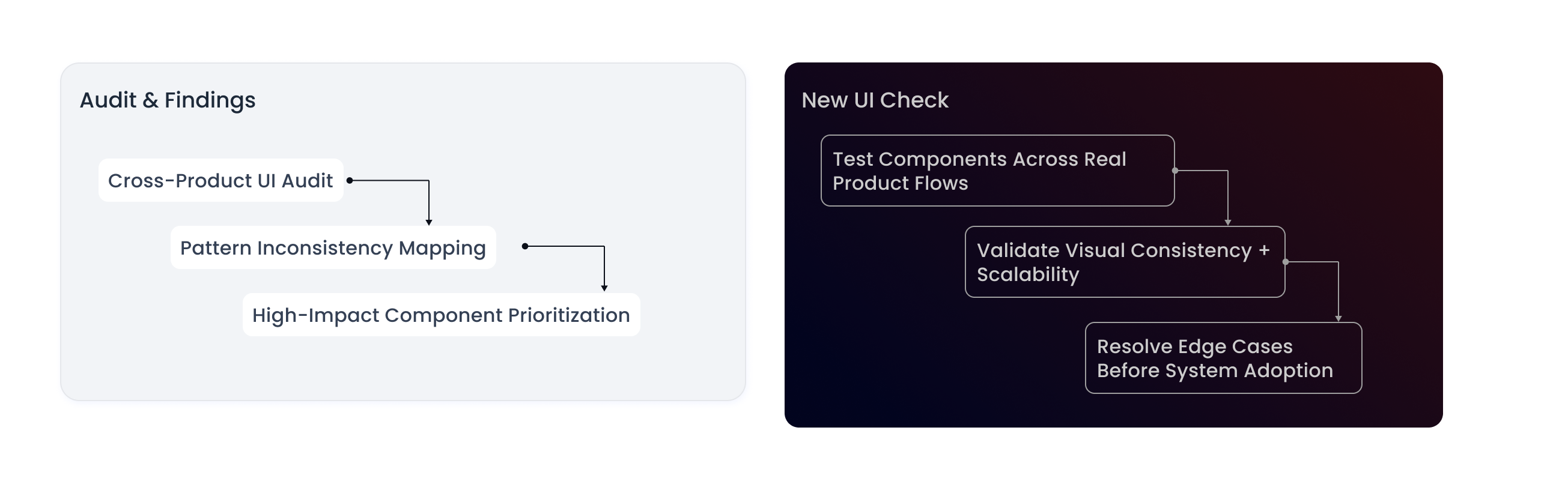
01
Audit
Component inventory, inconsistency quantification, stakeholder interviews, priority mapping
02
Foundations
Token schema, colour system, type scale, spacing grid, radius model, elevation system
03
Components
Priority 12 families — all states, dark mode, responsive behaviour, documentation
04
Dev sync
Token pipeline, daily handoff reviews, component implementation sign-off
05
Rollout
Incremental migration across 3 products, designer onboarding, contribution model
HEX process showing parallel audit, foundations, components, dev sync, and rollout

07 — System foundations

A strong system starts with strong DNA

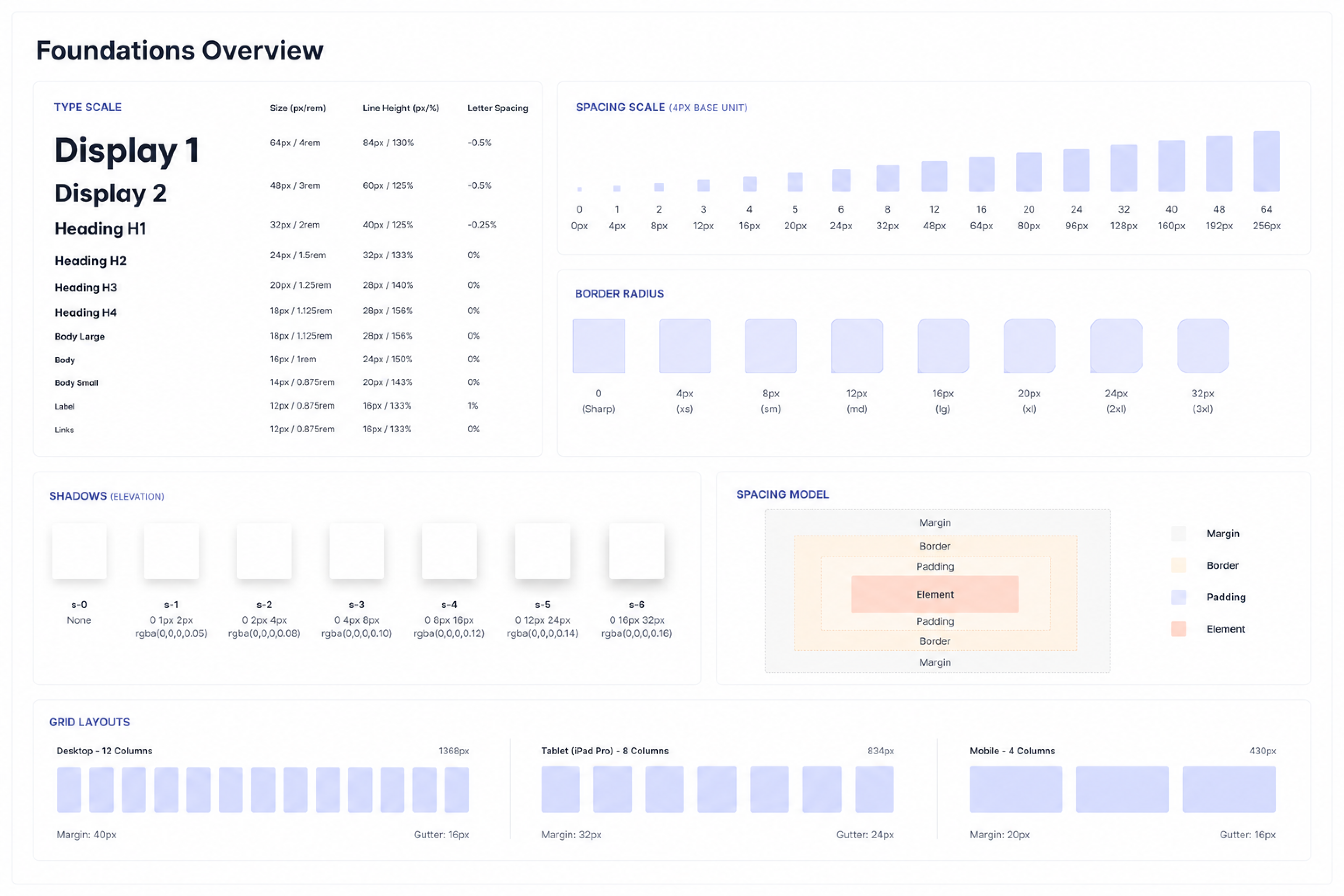
Foundations are the decisions that everything else inherits. Get them wrong and every component compounds the error at scale. I treated the foundation phase as the highest-leverage work in the entire project — spending disproportionate time here to ensure the components built on top would be self-consistent by design.
01 — Colour
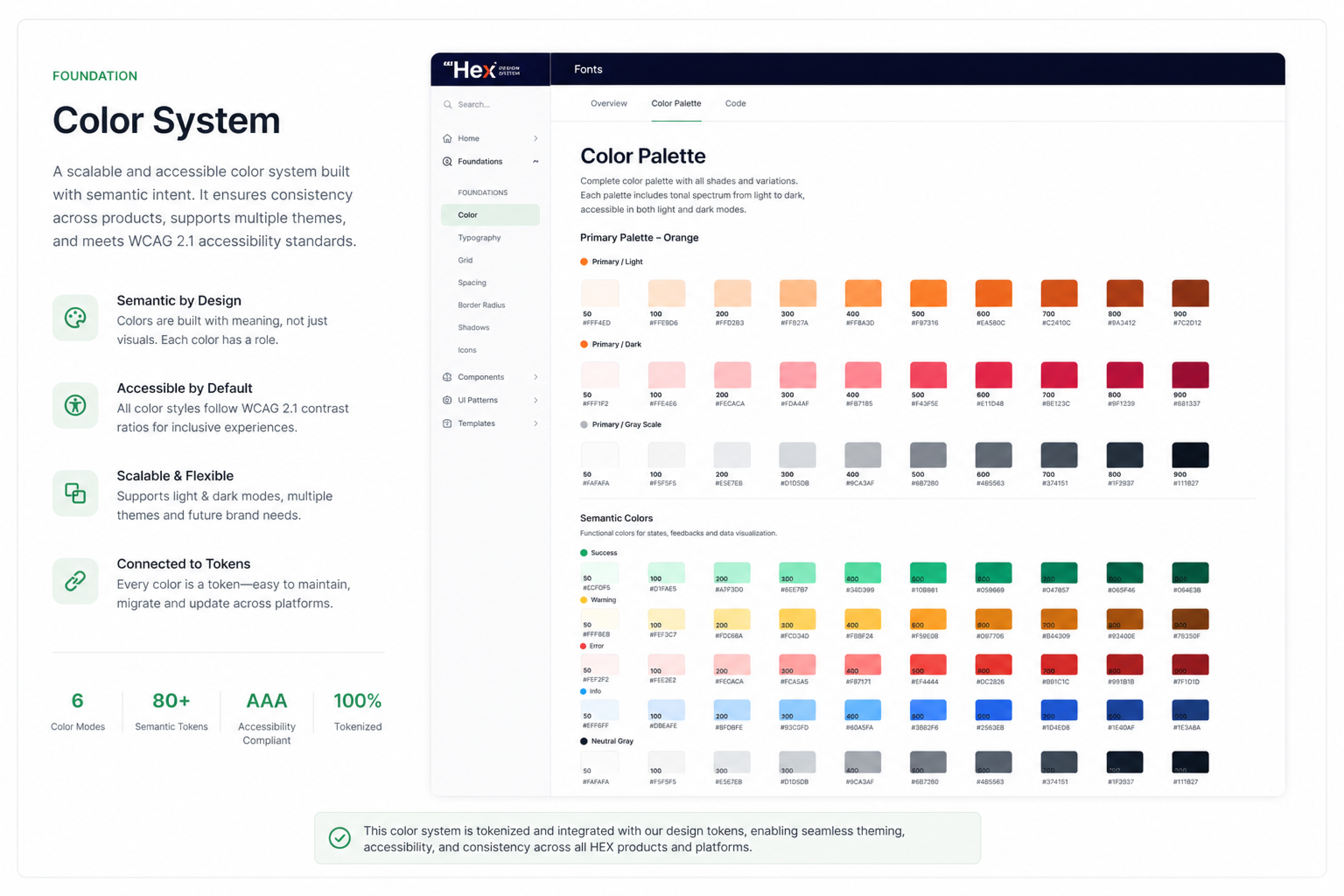
Semantic colour system
47 arbitrary hex values reduced to a 6-role semantic palette: brand, neutral, success, warning, error, and info. Each role has 10 tonal steps supporting both light and dark surfaces without any hardcoded overrides.
02 — Typography
Fluid type scale
11 ad-hoc sizes replaced with a 9-step modular scale (Display, Heading, Title, Body, Label, Caption). Every step has defined weight, line-height, and letter-spacing — eliminating the approximation that had caused hierarchy drift.
03 — Spacing
4px base grid
A strict 4px unit with an 8-step scale (4, 8, 12, 16, 24, 32, 48, 64). All component internal spacing and layout gaps are multiples of this unit. Engineers and designers reference the same scale, with zero ambiguity.
04 — Radius
5-level radius system
Radius values map to component personality: sharp (0px) for data tables, subtle (4px) for inputs, rounded (8px) for cards, pill (99px) for badges. Brand softness is consistent at every surface across all three products.
05 — Elevation
4-level shadow model
Flat, low, mid, and high elevation levels replacing arbitrary drop-shadow values. Each level is defined by blur radius, offset, and opacity — with identical implementation in Figma and CSS for zero-interpretation handoff.
06 — Iconography
Custom stroke icon set
Curated stroke-based icons at 16px and 20px viewbox. Consistent 1.5px stroke weight, rounded terminators, and optical corrections for alignment in enterprise UI contexts — designed to feel intentional, not generic.
HEX colour system with semantic palette and tonal scales HEX foundations covering typography, spacing, radius, and elevation

08 — Token architecture

Tokens are the why behind every value

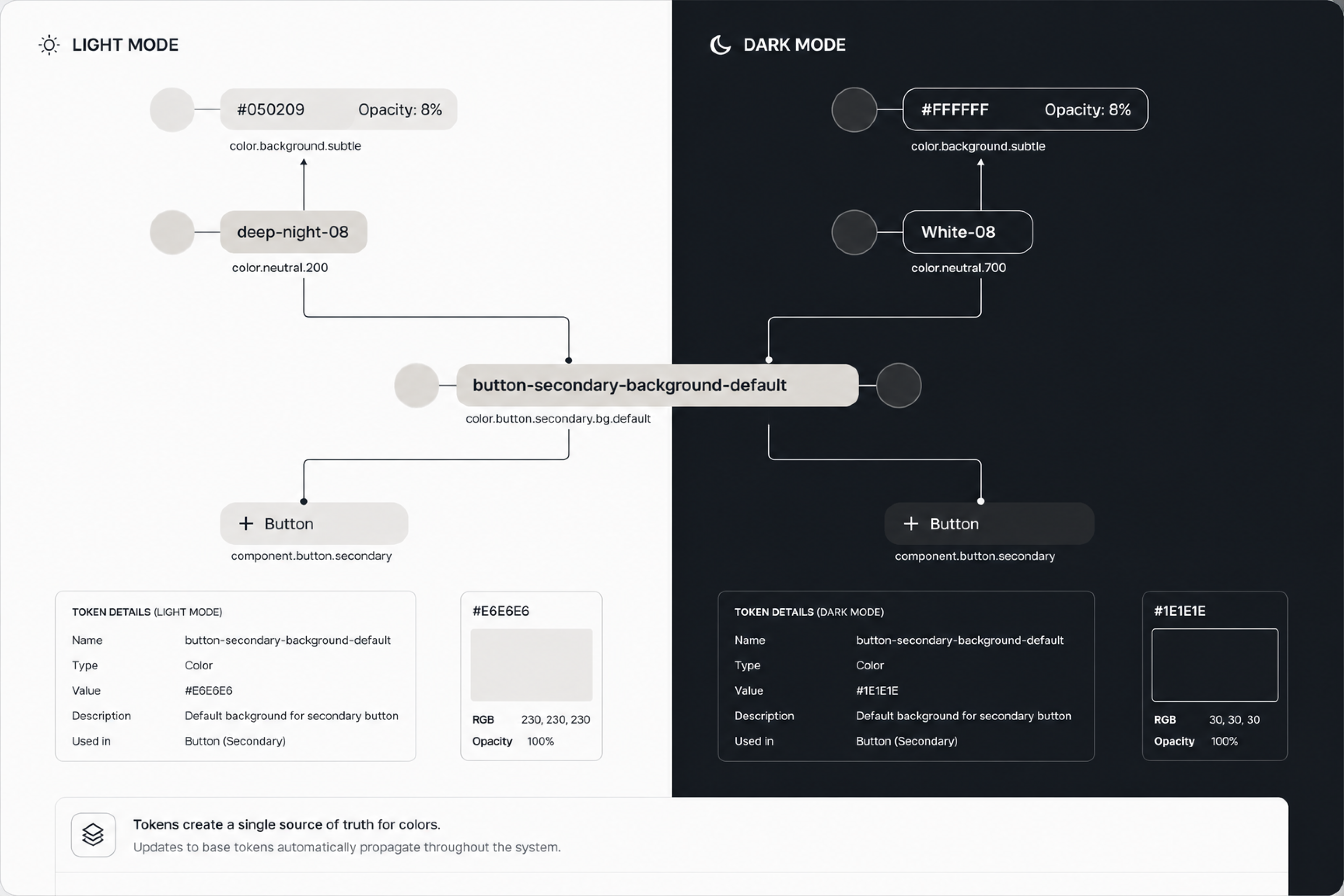
A colour system without tokens is just a style guide that eventually gets ignored. Tokens turn design decisions into a shared contract between design and engineering — one that survives product scale, team changes, and new themes. I designed HEX around a three-tier model, where primitive values, semantic intent, and component-scoped overrides are kept deliberately separate.

HEX Token Architecture — Three-Tier System
Primitive → Semantic → Component
Tier 1 — Primitive
Raw values
Base colour, spacing, and type values with no semantic meaning. These describe what something is — not where it's used.
color.blue.500spacing.4font.size.14radius.8
Tier 2 — Semantic
Intent-mapped values
Tokens that describe purpose, not value. What designers and engineers actually reference. Changing a theme only requires updating this layer.
color.action.primarycolor.surface.defaultcolor.feedback.errorspacing.gap.md
Tier 3 — Component
Component-scoped values
Tokens scoped to a specific component for overrides — allows variation without breaking the semantic layer or requiring hardcoded one-offs.
button.primary.bginput.border.focusbadge.error.texttable.row.hover

Why three tiers matter for dark mode and theming

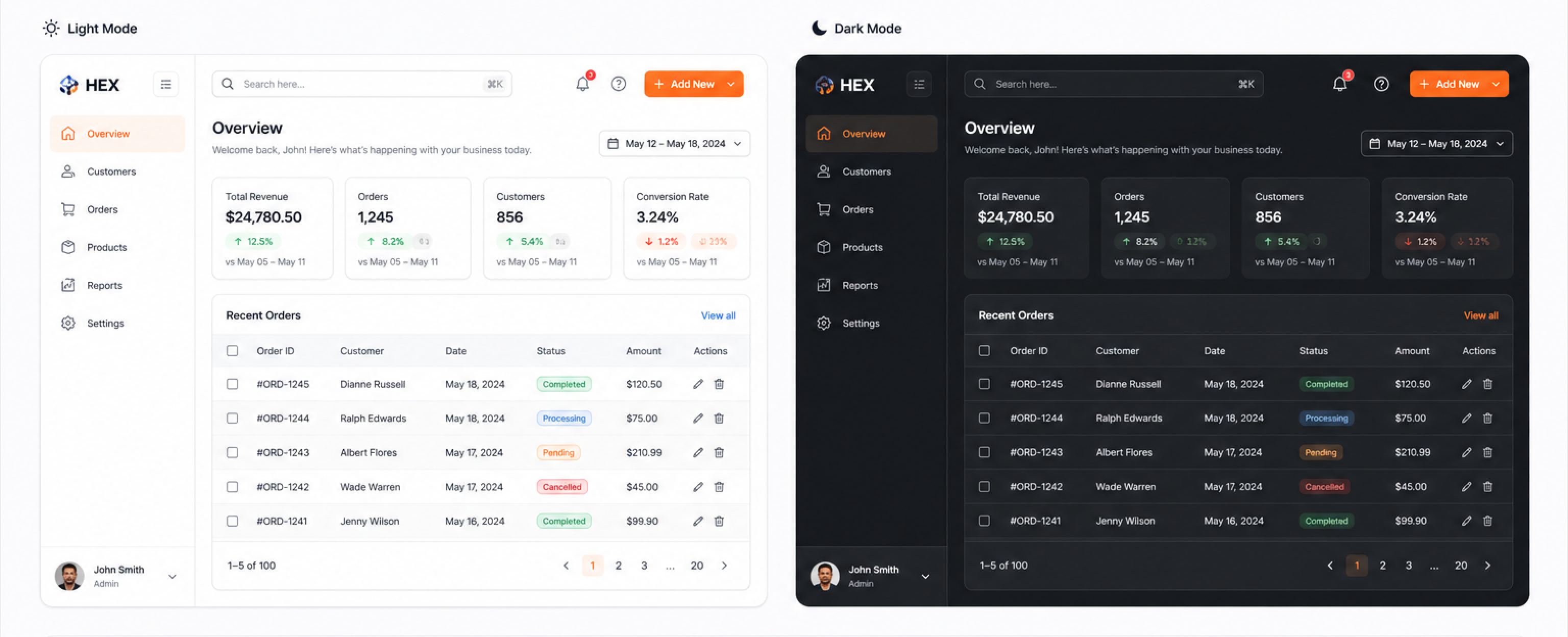
Dark mode is where flat token systems collapse. Because HEX separates primitive values from semantic intent, switching from light to dark only requires remapping the semantic tier — no component logic changes. A single JSON file swap at the semantic layer changes the entire product theme across all three products simultaneously.

Token pipeline — design to production
Design → Engineering token flow
🎨
Figma Variables
Source of truth — 3-tier structure
📄
JSON Export
Token Studio or Variables API
⚙️
Style Dictionary
Transform per platform
🌐
Production
CSS variables · Tailwind config
HEX token documentation showing three-tier token structure

09 — Components at scale

The reusable DNA of the product experience

With foundations and tokens in place, I built the 12 priority component families — each with all interactive states, responsive behaviour, dark mode, and full Figma documentation. Every HEX component is token-attached (zero hardcoded values), documented with usage guidelines and do/don't examples, and has an agreed engineering implementation that can be referenced from Storybook.
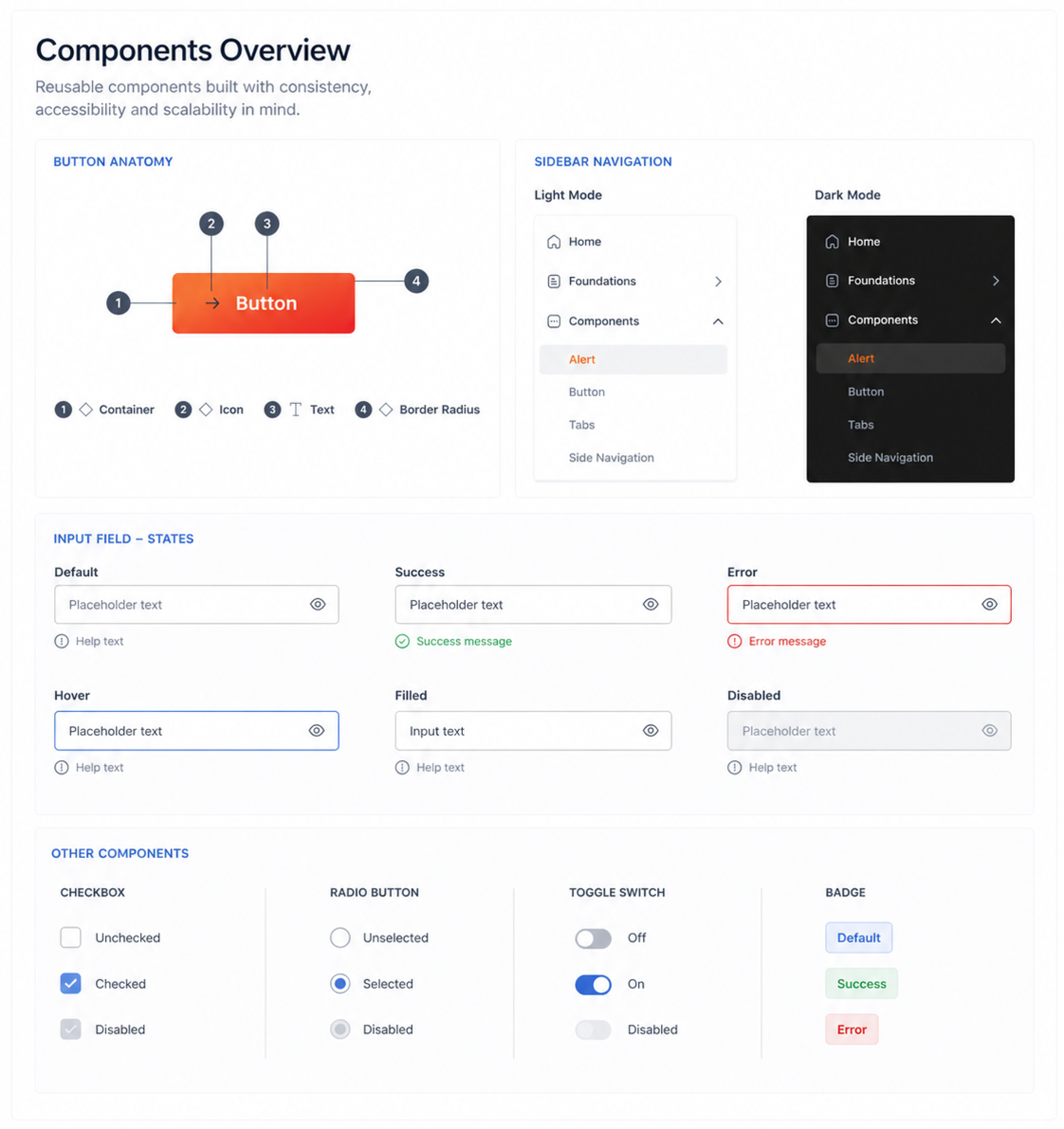
Design principle: Every component was validated against a real product use case before being added to the library. No speculative components — only components that were actively shipping or in the next sprint.
HEX component library overview showing 12 component families

Button system — the hardest component to standardise

Buttons were highest-priority and most contentious. Six implementations across three products had different heights, padding values, and icon positioning logic. The HEX button system unifies these into a single Figma component with properties: 4 variants (primary, secondary, ghost, destructive), 3 sizes, 5 states (default, hover, pressed, disabled, loading), and icon-left, icon-right, icon-only configurations — one source, all contexts.
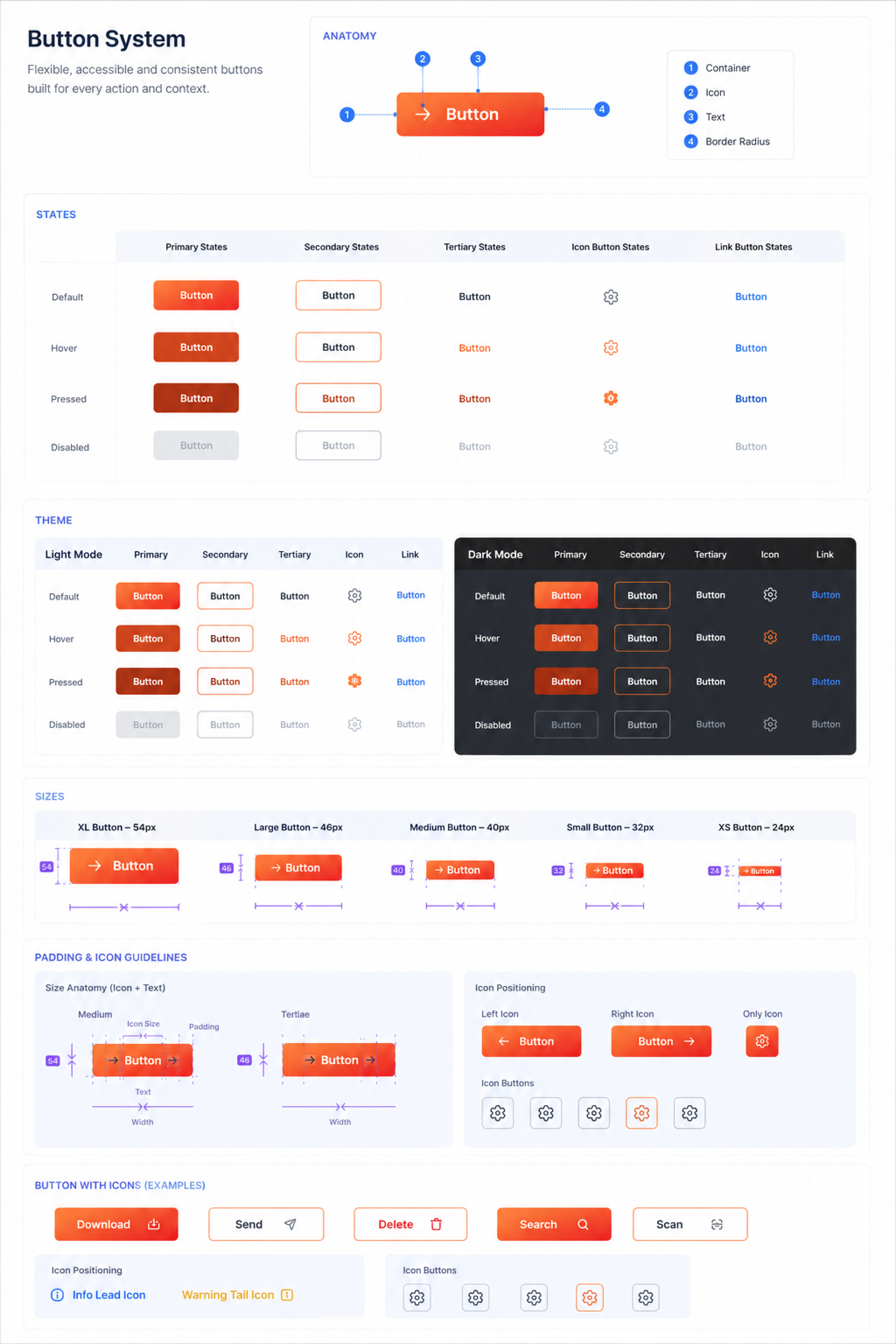
HEX button component system with variants and states

Data table — the enterprise workhorse

Tables are the highest-frequency component in enterprise SaaS and the most common source of visual inconsistency. The HEX table covers sortable and non-sortable columns, row selection, inline actions, sticky headers, empty states, loading states, and pagination — all in one compound component with clearly defined composition slots.
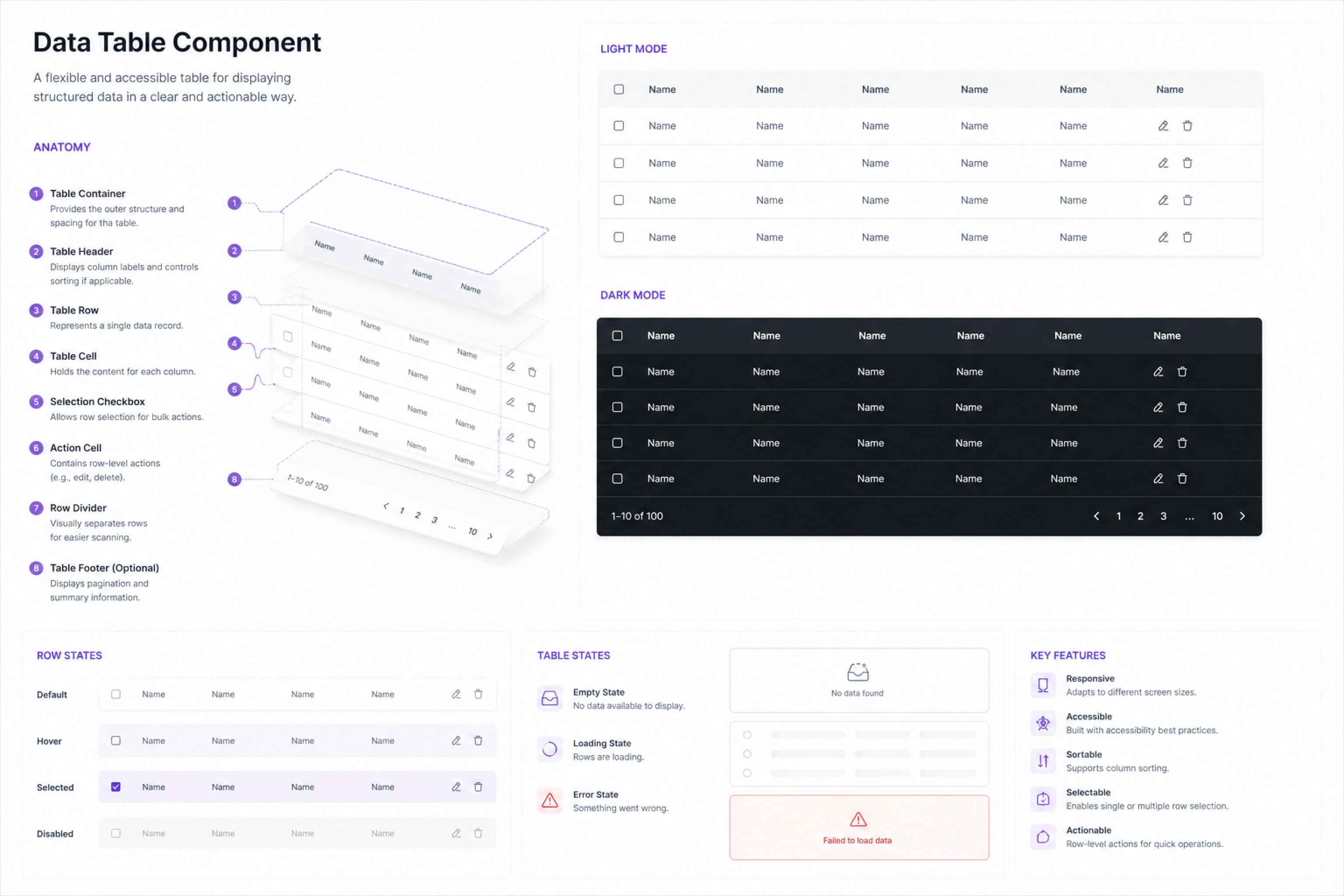
HEX data table component variants and states

10 — Design ↔ Engineering collaboration

A system that lives in code and Figma equally

A design system that only lives in Figma is a style guide. One that only lives in code is a component library. HEX needed to be both — with a clear, async-friendly contract between the two that didn't require a synchronous meeting every time something needed to ship.

Artefact
Design responsibility
Engineering responsibility
Token schema
Define names, values, tier structure in Figma Variables
Implement via Style Dictionary → CSS custom properties
Component spec
States, variants, spacing, edge cases — annotated in Figma
Build in library, match token attachment exactly
Documentation
Usage guidelines, do/don't examples, prop table
Storybook stories for all variant + state combinations
Change process
Proposal in Figma with rationale and impact scope
Review, estimate, merge PR — design signs off on implementation

Documentation built to work without a walkthrough

Working remotely, I built every component spec to be self-sufficient — annotating not just spacing values but the why behind decisions, what edge cases to watch for, and explicit do/don't examples. This documentation investment upfront eliminated the back-and-forth that had previously stretched handoffs across days into single-pass reviews.
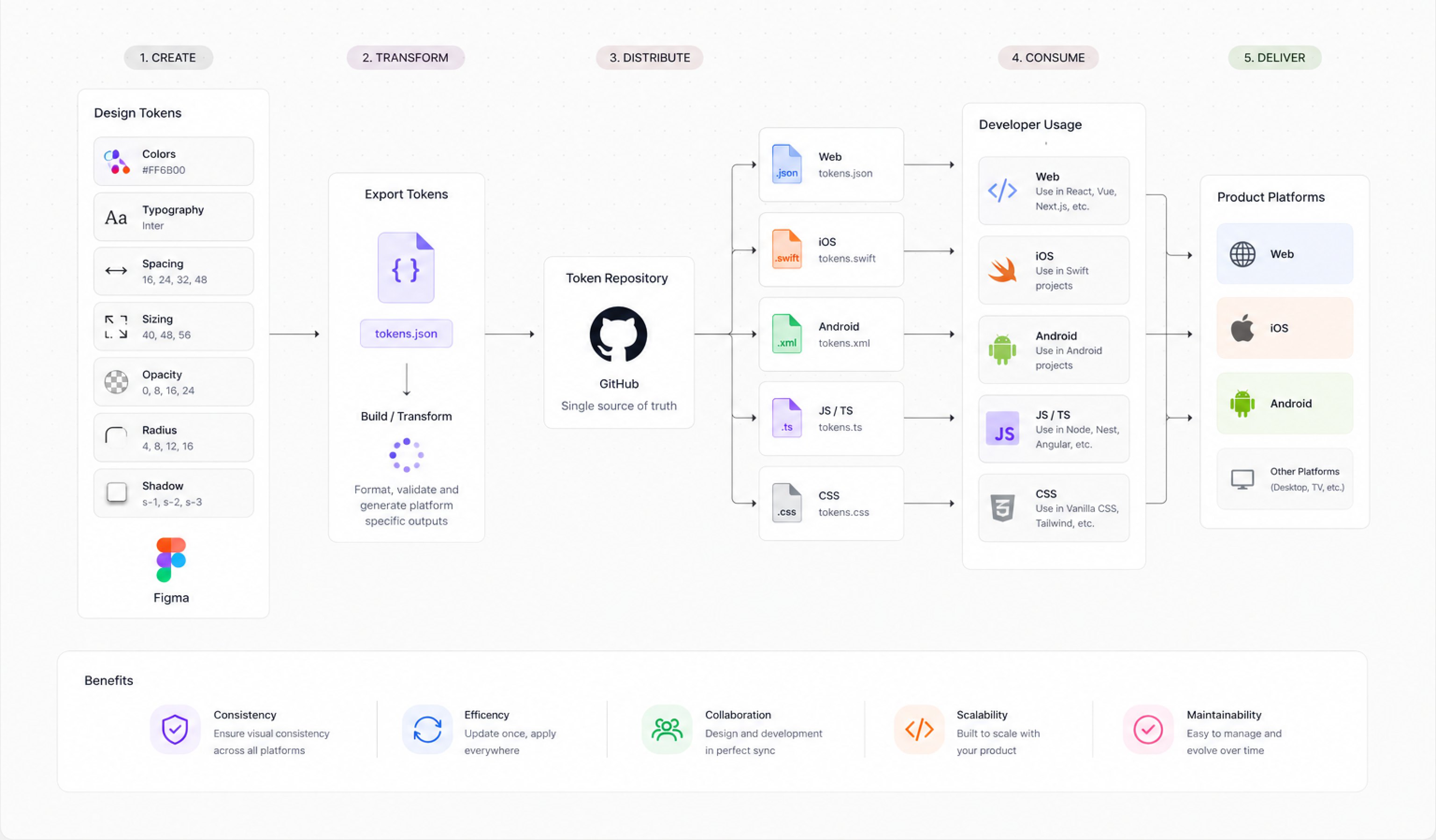
HEX design and engineering documentation workflow in Figma and code

11 — Impact

What HEX changed in practice

The clearest measure of a design system's success is adoption. HEX was fully adopted by all eight designers within 3 weeks of launch and incrementally rolled out across all three products over 6 weeks. Engineering migrated all new feature work to HEX-based components immediately — legacy component migration is an ongoing background process.
35%
Faster design-to-dev handoff time across all three products
Products unified under one Figma component library and token schema
↓40%
Fewer design review rework cycles — measured over 8 weeks post-launch
8
Designers across 3 products aligned to one source of truth within 3 weeks
12
High-priority component families shipped with full state coverage and async documentation
0
Hardcoded colour or spacing values in any component shipped after system launch
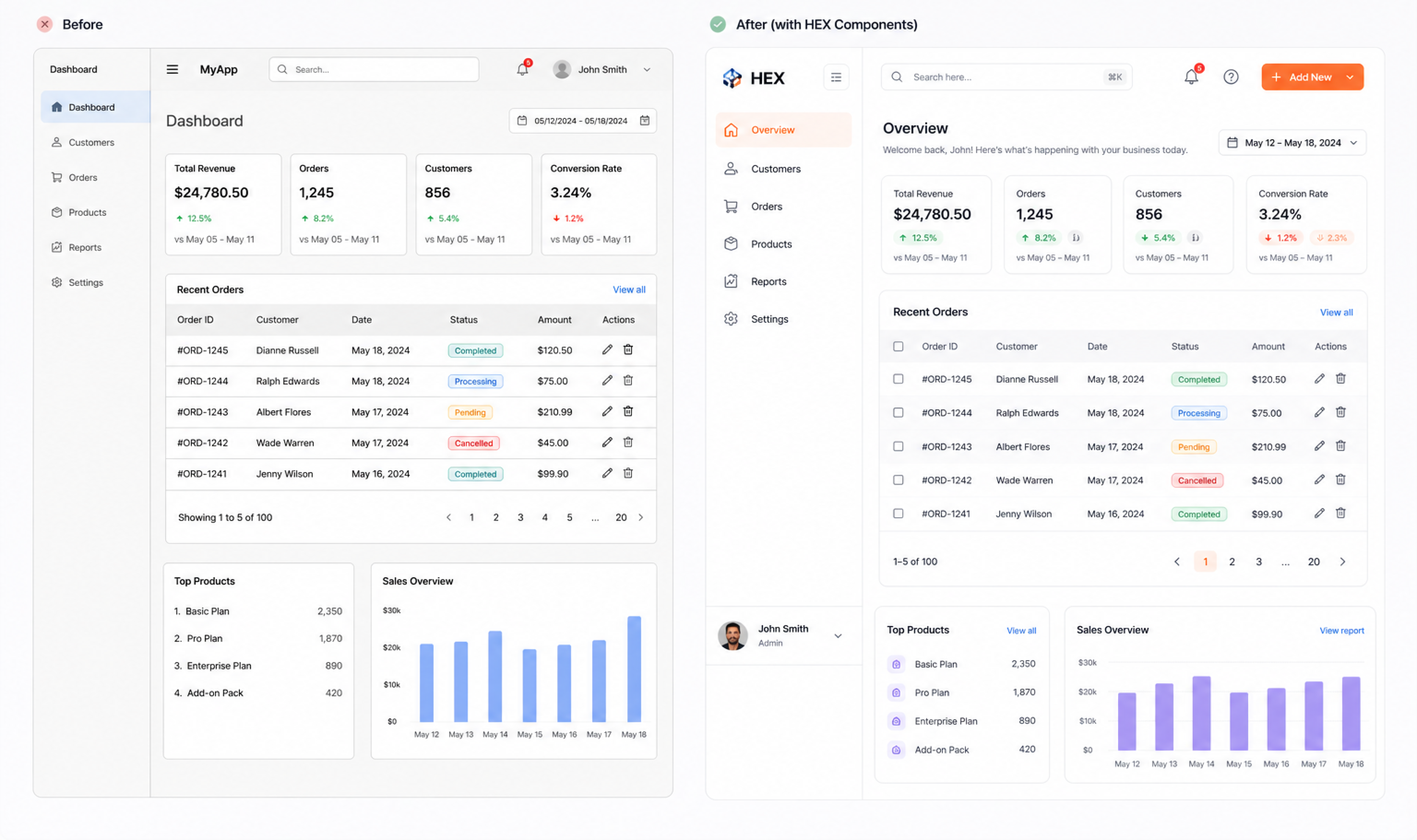
Before and after comparison of product screen after HEX adoption HEX light and dark theme token application comparison

12 — Reflection

What building a system at speed taught me

HEX was designed and shipped while I was simultaneously delivering feature work on a live product. That constraint forced prioritisation decisions I wouldn't have made in a pure systems project — and taught me things a dedicated design system sprint couldn't have.

What I'd keep
Audit-first — quantifying inconsistency made the business case undeniable before a single component was designed
Building in parallel with product delivery — adoption was immediate because every component had a real use case from day one
The three-tier token model — the semantic layer made dark mode and future theming genuinely low-cost to implement
Async-first documentation — self-sufficient specs eliminated most handoff calls and reduced review lag
Incremental migration — keeping product velocity intact by never requiring a big-bang rewrite
What I'd change
Would establish component contribution guidelines on week one — ambiguity around "who can add components" created friction at the edges
Should have run a structured designer onboarding session at launch rather than assuming the system was self-explanatory
Would have set up Storybook integration from the start rather than retrofitting after the library was built
Under-communicated progress to business stakeholders — the system's value was invisible until adoption metrics appeared

The most important thing I learned: a design system is never finished. HEX at launch was a starting point, not a destination. The real work — maintaining it, evolving it, deprecating components that no longer serve real use cases — is what separates a system that scales from one that becomes another layer of debt. I built with that mindset from the beginning, and it changed how I made every decision.

Explore more projects
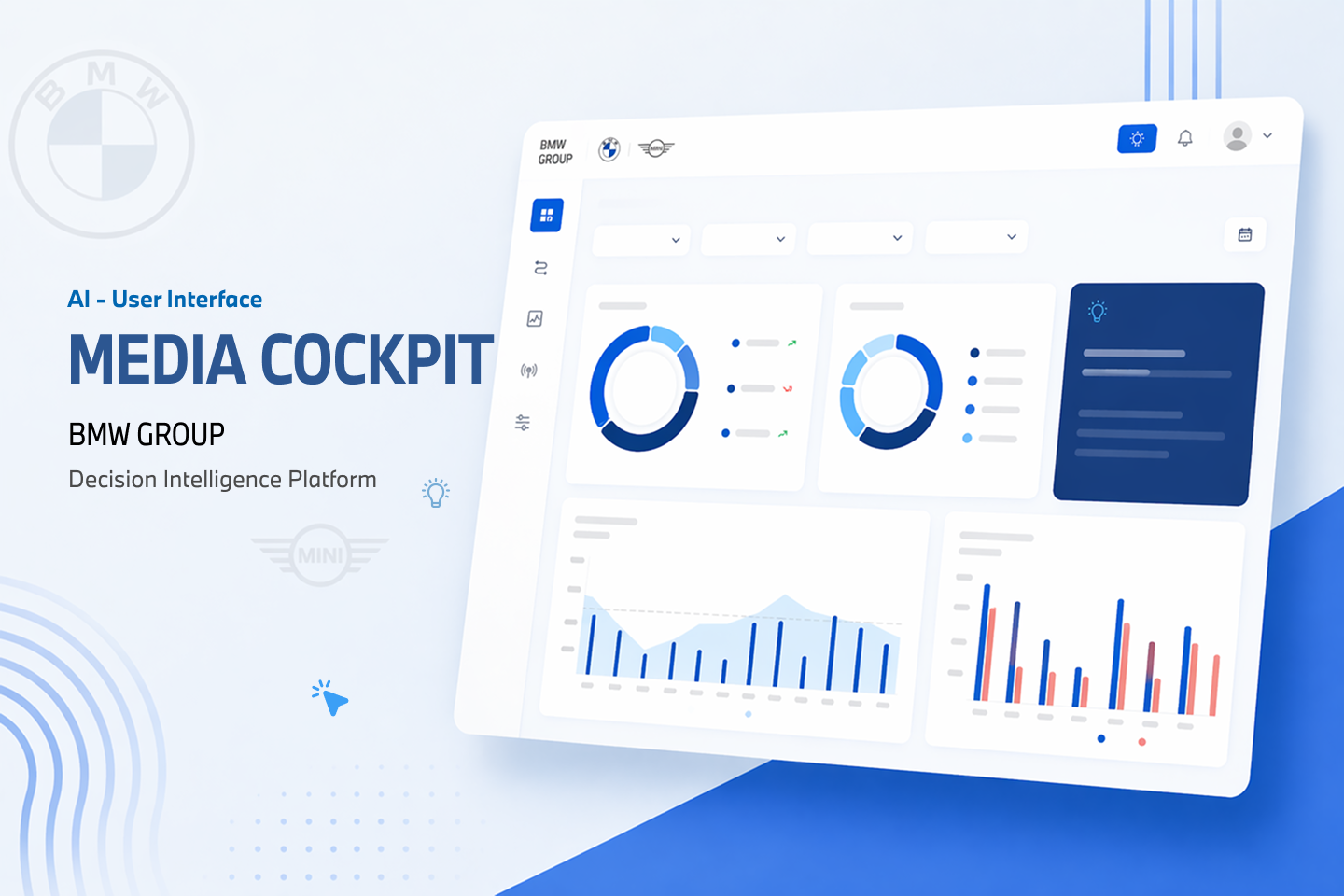
BMW case study preview image